About Kristan Franco

Kristan Jan Q. Franco is rooted from General Santos City, and is a 20-year old student of Notre Dame of Dadiangas University. With the course Information Technology, he is into web designing, graphic designs, ads, and photography. Having been introduced into digital tools such as Adobe Photoshop and CSS coding, he began designing variety of graphics in his high school days. When he stepped into college, his interests expanded. With a cheap digicam and a Single Lens Reflex camera, he was engaged into photography and sees it as a hobby. Read more about KFranco »

Free Left 4 Dead Photoshop Brushes

Posted by Kristan Friday, January 8, 2010 View Comments

Recently, I've found myself shooting zombies by playing Left 4 Dead, and it's latest version, Left 4 Dead 2. After the release of Left 4 Dead 2, I started playing the game all over again.

Later on, I eventually enjoyed the 2 versions of Left 4 Dead. From a usual zombie game, it rocked a lot of gamers by featuring zombie bosses such as Boomer, a fat-spitting zombie, and a Smoker, infamous for its long tongue.

kristanfranco.blogpsot.com

With this, I was inspired to create a zombie-related movie poster and turn some Left 4 Dead wallpapers and screenshots into something essential to Photoshop, more particularly, brushes.

In case you're not so sure about the brushes I made, I tried using them in a plain canvas, and here's how they look:

1.) The Left 4 Dead Bosses (Boomer, Hunter, Smoker)

kristanfranco.blogpsot.com


2.) Tank (Another L4D boss), Zombie Hand, and a screenshot on one of the Safe rooms

kristanfranco.blogpsot.com


3.) L4D Logo, Horde Logo, 4 Survivors, and a splatter brush of the L4D Bosses (witch included)

kristanfranco.blogpsot.com


DOWNLOAD MY FREE LEFT 4 DEAD PHOTOSHOP BRUSHES HERE.

You might also like creating your own Photoshop brushes, click here.


Done reading? If you liked my posts, then:

Click here to Subscribe to FREE email updates from "Kristan Franco", you wouldn't want to miss out anything that can be valuable to you and your blog, would you?
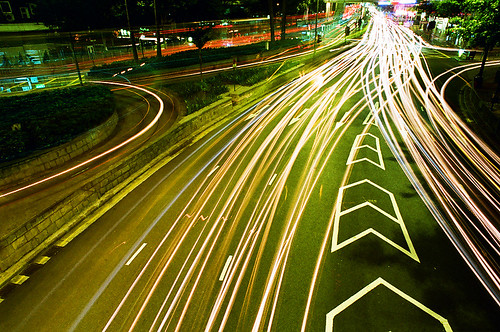

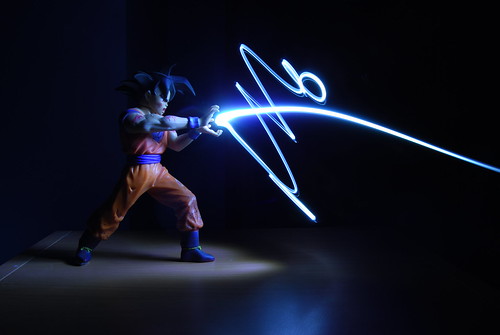
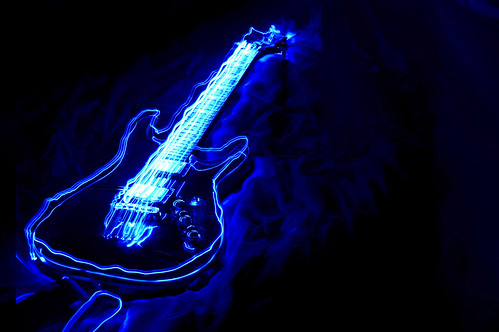
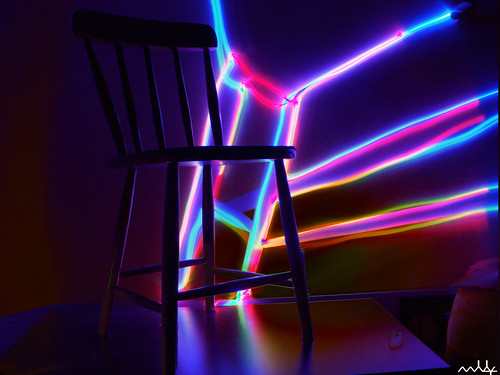
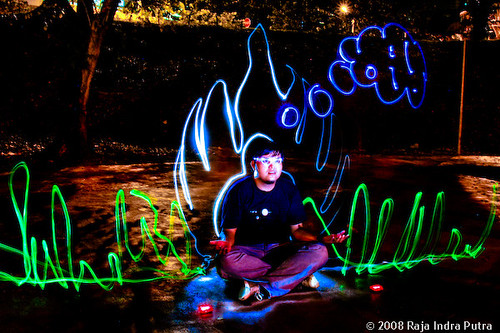
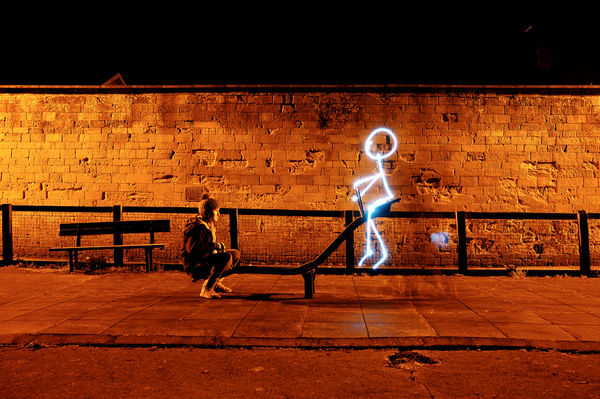
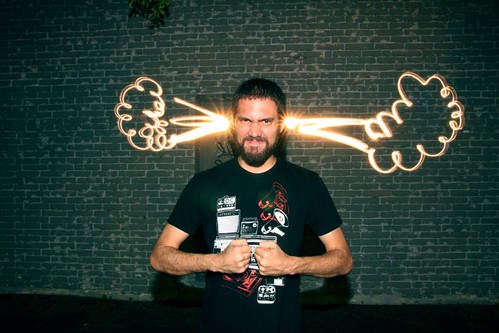
Light painting, also known as light drawing or light graffiti is a photographic technique in which exposures are made usually at night or in a darkened room by moving a hand-held light source or by moving the camera. In many cases the light source itself does not have to appear in the image. The term light painting also encompasses images lit from outside the frame with hand-held light sources.

For more knowledge on this photography technique, I'm gonna share this 15 amazing light painting photos I found in Flickr that will definitely inspire you:

kristanfranco.blogpsot.com


kristanfranco.blogpsot.com


kristanfranco.blogpsot.com


kristanfranco.blogpsot.com


kristanfranco.blogpsot.com


kristanfranco.blogpsot.com


kristanfranco.blogpsot.com


kristanfranco.blogpsot.com


kristanfranco.blogpsot.com


kristanfranco.blogpsot.com


kristanfranco.blogpsot.com


kristanfranco.blogpsot.com


kristanfranco.blogpsot.com


kristanfranco.blogpsot.com


kristanfranco.blogpsot.com


Done reading? If you liked my posts, then:

Click here to Subscribe to FREE email updates from "Kristan Franco", you wouldn't want to miss out anything that can be valuable to you and your blog, would you?

Aside from a week full of school stuff, I also experienced frequent brownouts. Since brownouts are boring, perhaps, the very best thing to do during "electricity-less" nights is to play with a camera! A very fun way to do this is to paint using light!

kristanfranco.blogspot.com


Light painting is a fun digital photography technique which gives you great results. Since this technique is freestyle you don't need to experiment much of it. You'll just need to learn shutter speed, and aperture, and be sure to have this following items:

1.) a camera capable of long exposures. DSLRs are the appropriate example.
2.) Tripod. Since we use slower shutter speed, probably 15 to 30 seconds, we should make sure that the camera will stay still, or else, your output will be a crap. If you don't have one, create your homemade tripod!
3.) Source of light. Flashlight is the best example. You need this to paint with light.
4.) Dark location. In my trial photos, I used the living room as the location because there is no moving object with light that could ruin my output.

How I started it:

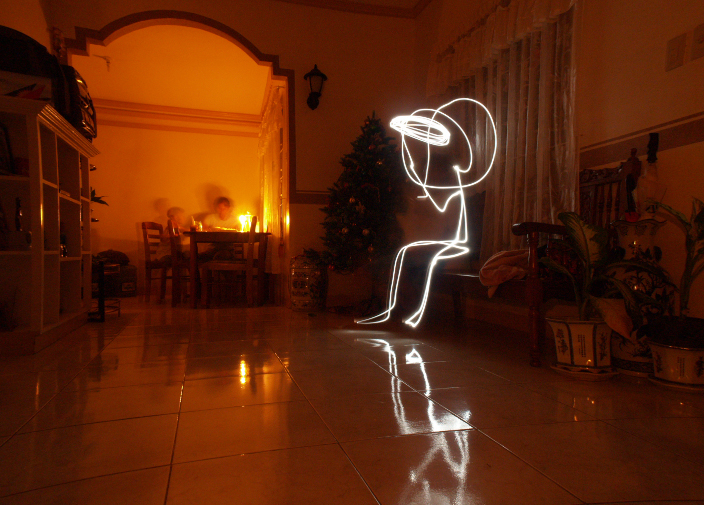
I set a slower shutter speed, ranging from 15 to 20 seconds. I set the aperture to f14, with 300 ISO.

The output:

Within 20 seconds, I drew a stickman sitting, and if your perception is the same with mine, then good, but if it was not like mine, then the output must be crap.

kristanfranco.blogspot.com

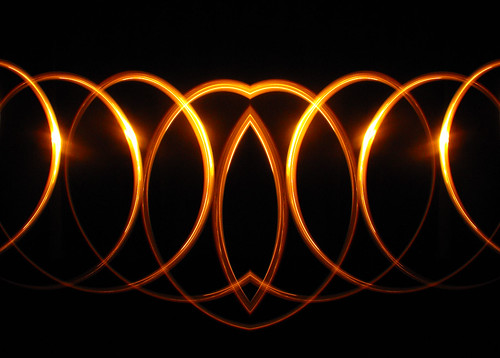
...and this? It seems like an after-effect of 2012 movie. The walls are cracking, and the lava will spill!

kristanfranco.blogspot.com

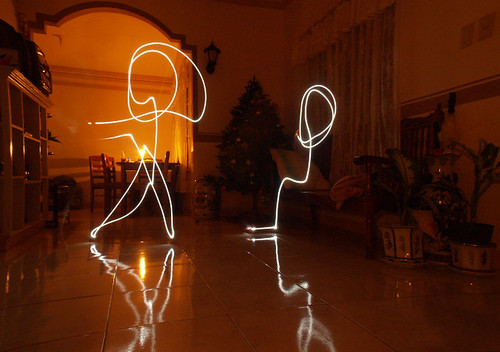
Lastly, the most freestyle output, STICKMEN! If you perceived these as stickmen, then highfive!
kristanfranco.blogspot.com

So, start painting with light now! You'll enjoy seeing those clumsy and perfect shots you got. Let your imagination work!

P.S. I'll be posting some of my latest light-painting outputs next time.

Done reading? If you liked my posts, then:

Click here to Subscribe to FREE email updates from "Kristan Franco", you wouldn't want to miss out anything that can be valuable to you and your blog, would you?
Free PSP Wallpapers

Posted by Kristan Thursday, January 7, 2010 View Comments

Since i've been busy these past few days I just scanned my recent works and decided to turn them into PSP sizzlers. Eventually, PSP has been a very common gadget nowadays, and creating wallpapers for this kind of game gadget is very easy.

Some of these are my creations for Plurk Layouts (I guess they're not available anymore), some are from my homemade wallpapers, and some are just out of boredom.

How to save: Click image>right click>save as

1.) Humanity

kristanfranco.blogspot.com


2.) My Rainbow PSP

kristanfranco.blogspot.com


3.) Rule of Thumb

kristanfranco.blogspot.com


4.) Lebron James

kristanfranco.blogspot.com


5.) Retro

kristanfranco.blogspot.com


6.) Dismember

kristanfranco.blogspot.com


7.) Green Bacteria

kristanfranco.blogspot.com


8.) Rule of Thumb 2.0

kristanfranco.blogspot.com


9.) Life Quotes

kristanfranco.blogspot.com


10.) Graffiti

kristanfranco.blogspot.com


Done reading? If you liked my posts, then:

Click here to Subscribe to FREE email updates from "Kristan Franco", you wouldn't want to miss out anything that can be valuable to you and your blog, would you?
Inspiring Interface Designs from Web & Patterns

Posted by Kristan Wednesday, January 6, 2010 View Comments

A huge list of screenshots on interface design patterns is showcased in this outstanding site known as, Web & Patterns.

Provided with a category from backgrounds and buttons down to logos and typography, searching design patterns was made easier!

In viewing a certain page, every thumbnail has a short comment about it's interface design and "why it was included on their gallery". Since anyone can share their opinions on those screenshots, inspiration can be seen through every constructive criticism.

kristanfranco.blogspot.com

Overall, Web & Patterns. is really a big help to those who aim for a good interface design element. Their showcase is a good way to be inspired.

kristanfranco.blogspot.com

Now, while reading this post, aren't you inspired yet?

Done reading? If you liked my posts, then:

Click here to Subscribe to FREE email updates from "Kristan Franco", you wouldn't want to miss out anything that can be valuable to you and your blog, would you?
Hooray for another month of blogging under this blog! A new month for another wallpaper. This time, I eventually went freestyle. I just dipped a lot of elements in this wallpaper, and eventually came up with a puzzling title, "Techno Culture". Perhaps, the female element in this wallpaper and the brushes I used defined the random title.

kristanfranco.blogspot.com

This wallpaper is all about:

I just don't know. All I know is that I experimented using a female figure, lots of Photoshop brushes, and textures. Set layers on different blending options and eventually came up with a medieval-colored wallpaper. So here you go!

Skills used:

Textures
Brushes
Layer Properties
Font Manipulation

This wallpaper is available in two resolution:

Techno Culture 1024x768
Techno Culture 1280x800

Done reading? If you liked my posts, then:

Click here to Subscribe to FREE email updates from "Kristan Franco", you wouldn't want to miss out anything that can be valuable to you and your blog, would you?

My First Panning Shot

Posted by Kristan Tuesday, January 5, 2010 View Comments

I'm definitely back at school, and life there is pretty fast. Since the midterm examinations are coming, school requirements are the worst!

Well to much for the current happening around. Last Christmas break, I'm a bit relaxed from the school pressures. One way to do this is to do outdoor photography. Since I am a bit much more of a beginner, I tried other techniques that I wasn't able to do before. My latest tryout shot is all about panning, and this photo is my very first panning shot.

Panning, in Photography term, is a shooting technique where a shooter is focused on a moving subject, keeping it into the same position while moving until the duration of the exposure. The use of longer exposure and slower shutter speed blurs the background while keeping the subject focused, thus giving the photo a more dramatic effect.

In this photo, I didn't use a tripod so pardon me for a quite poor output. With a 42mm focal lenght, I set the shutter speed to 1/20 and f5.6 for the aperture. So, this is my first panning shot. Practice makes perfect!

kristanfranco

What do you think? Comment below.

Done reading? If you liked my posts, then:

Click here to Subscribe to FREE email updates from "Kristan Franco", you wouldn't want to miss out anything that can be valuable to you and your blog, would you?
99 Rooms is a Flash point-and-click game, approached in a different manner, it is made of real wall paintings, and photographs. Just like the other Flash game, Hotel 626, 99 Rooms also focus on "escaping the rooms". The goal is to escape all the 99 rooms, quite enough, right?

kristanfranco.blogspot.com

Well, the scary Hotel 626 is a bit different because it contains movie clips after every point-and-click portion while in this grafitti-inspired 99 Rooms, the use of real photographs as background and overlaying Flash animation is the keypoint. Some objects are inanimate, the only animation done is the graphics moving for user's interaction. This eventually make the game more dramatic, along with it's surreal sound effects.

Take a look at these screenshots and check out the site to experience an interactive game approached in this very unique way!

kristanfranco.blogspot.com


kristanfranco.blogspot.com


kristanfranco.blogspot.com


Overall, this site really rocks! Although this was publish more or less 2 years ago, the simplicity of each graphic used makes itself a good trademark! The sound effects suits the game, and each animation is at its best!

If you're having a hard time passing each level, then here's your best but not so challenging weapon, this cheat site! But I suggest, trying harder is quite an enjoying way passing through the 99 Rooms! Goodluck!

Done reading? If you liked my posts, then:

Click here to Subscribe to FREE email updates from "Kristan Franco", you wouldn't want to miss out anything that can be valuable to you and your blog, would you?

Applying Watercolor Effect to Photos

Posted by Kristan Sunday, January 3, 2010 View Comments

Photos with good contrast on colors and photos which maintain bright colors are very good for this effect. Since we are turning a photo into a watercolor canvas, we needed popping colors which bright colors could provide. If you wanted to try out this one, I suggest that you should use photos that are bright and vivid. Photos with larger dimension give a much more realistic effect.


In this tutorial, I recently shot a bright photo that its yellow flowers and blue sky are quite enough to produce a watercolor effect. I use a larger resolution to cope up with the filter values that we'll set up later.

kristanfranco.blogspot.com


First Step: Duplication

After opening your photo in Photoshop, duplicate it three times just like in the example:

kristanfranco.blogspot.com


kristanfranco.blogspot.com

Second Step: Hiding the 2 Duplicated Layers

Since we are focusing on a certain layer in each step, hide the last 2 duplicated layers and select the first duplicated layer, certainly, the next layer after your original photo.

kristanfranco.blogspot.com

Third Step: Applying Cutout filter to the 1st duplicated layer

Since we have selected the first duplicated layer, go to Filter>Artistic>Cutout. Set the values just like below.

kristanfranco.blogspot.com

Fourth Step: Blending Options of the first duplicate

After transforming it to Cutout, set its blending options to Luminosity.

kristanfranco.blogspot.com

Fifth Step: Done with the first duplicate, next is the 2nd

Since we hid the 2nd and 3rd duplicate, we will now click the "eye" button to make the 2nd duplicate visible. Now select the 2nd duplicated and go to Filter>Artistic>Dry Brush and set the values just like below.

kristanfranco.blogspot.com

Sixth Step: Blending options of the 2nd duplicate

After succeeding in the Dry Brush, change the blending options of the 2nd duplicate to Screen.

kristanfranco.blogspot.com


Sixth Step: Working now with th 3rd duplicate.

We're done with the first two duplicates, and this will be the last duplicated layer. Make it visible again, and select it afterwards. After selecting, go to Filter>Noise>Median, and set your value. I set mine into 12 pixels.

kristanfranco.blogspot.com

Seventh Step: Setting the Blending Options.

At last, we are done with filtering. The last thing to do is to set the 3rd duplicate's blending options into Soft Light. Now witness your final output.

kristanfranco.blogspot.com


This is my final output:

kristanfranco.blogspot.com

Don't forget to share yours!

Done reading? If you liked my posts, then:

Click here to Subscribe to FREE email updates from "Kristan Franco", you wouldn't want to miss out anything that can be valuable to you and your blog, would you?
Stay Connected


Recieve FREE email updates from Kristan Franco

Enter your email address:


Bookmark and Share


Blogs You'd Like to Visit